
How to Change an Approved PDF Without Breaking Production
A practical model for verifying content, geometry, and production after an automated edit.
A clear brief does not make a safe edit
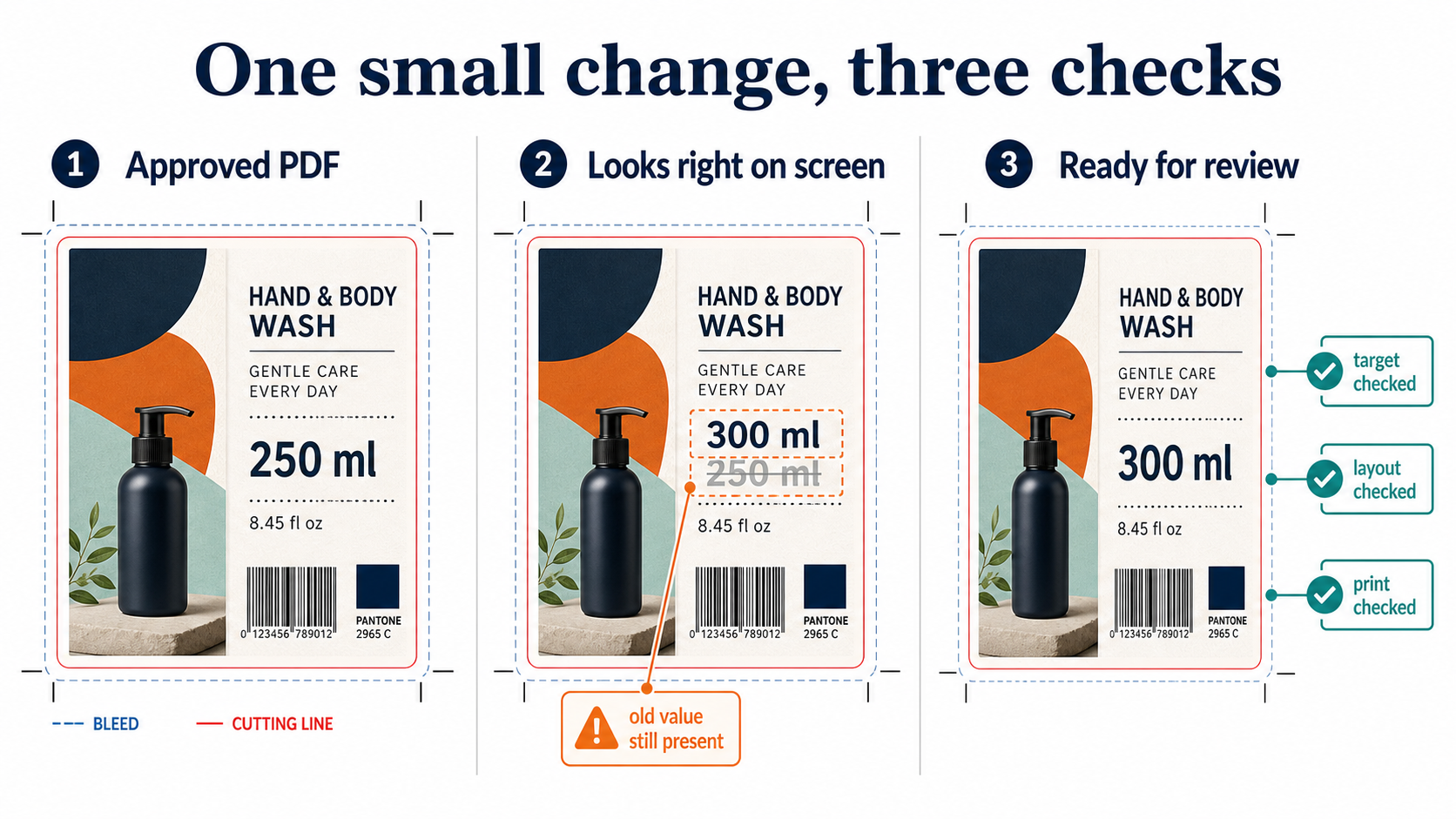
Consider this job: a prepress operator receives an approved packaging PDF shortly before a production handoff. The brief says, "replace 250 ml with 300 ml on the front panel." The design file is not part of the handoff, and reopening the source would delay the job.
The edit looks small. The job is not. The operator must change the intended quantity, keep the approved artwork intact, and show that the file is still suitable for the next production step.
The useful question is not whether the PDF still looks right. It is whether the declared change happened, the rest of the artwork stayed within its approved limits, and the production instructions still describe the same job.
A quantity change is enough to show the risk
The front-panel quantity may be one short piece of text in a large label or carton. It may sit beside a product image, inside a colored panel, near a barcode, or close to a cutting line. The new value may need a different width while keeping the same alignment and clear space.
Several failures are possible. The change may hit another occurrence of "250 ml." The old value may remain in the file under the new one. The new value may move nearby artwork. A print color or cutting line may change even though the page still looks acceptable on a monitor.
The request also has to identify the role of the object. A quantity on the front panel, a quantity in a nutrition panel, and a quantity inside a barcode payload are not interchangeable. The same characters can have different consequences depending on where they occur.
The same problem appears in publishing. A team may need to update an imprint or copyright notice across 200 approved backlist titles. The change is repetitive, but each title can place the notice differently. The workflow still has to identify the intended occurrence, preserve the composition, and prove that nothing else changed.
The PDF contains more than the page you see
For a technical introduction to how PDF text and pages are built, see Why Is PDF So Hard to Edit? This article focuses on what those details mean for a controlled change to approved publishing or print artwork.
A PDF describes a page rather than storing all of a designer's intent. Many pages are built from text runs, images, paths, masks, and graphic-state settings positioned at coordinates. Some PDFs also carry logical structure; many do not. A viewer assembles those instructions into a page. It does not tell an editing system which visible item is the intended business object or which objects must remain separate.
The page view also combines information that may be handled separately later. A color may be a process color, a named spot color, or a technical ink. A top object may knock out the ink below it, or overprint it. Transparency can change how colors blend when the file is rendered. Bleed, page boxes, dielines, and finishing marks may matter even when the page looks correct.
Reuse makes the scope harder to see. A PDF can place the same underlying image or form object several times. It can also reuse graphic-state settings that affect how objects render. Editing one placed occurrence is different from editing the shared resource. If a tool changes the resource, every appearance that uses it may change. In PDF terms, these resources can include image XObjects, Form XObjects, and ExtGState dictionaries. The editing system has to know which level the request addresses.
Packaging PDFs can carry production content that is not ordinary artwork. Dielines define the physical boundary. Crease and fold lines guide finishing. Varnish, foil, braille, opaque white, and other processing steps may use separate objects or metadata. ISO 19593-1 defines a way to associate processing-step information with PDF content, and the Ghent Workgroup describes its importance for packaging workflows.
These details lead to three invariants. An invariant is a condition that must hold before and after the declared change, except where the change explicitly permits a difference. The content invariant asks whether the right business content changed and protected content stayed correct. The geometry invariant asks whether the new and unchanged artwork still fit and keep their relationships. The production invariant asks whether the affected and unaffected properties still describe an acceptable print and finishing job.
The content invariant: did the right thing change?
The first test is occurrence, not just text matching. A document-wide search can find several copies of a product code, warning, quantity, or URL. The request must identify the page, panel, region, or object that is allowed to change. If the system finds two possible targets when the request expects one, it should stop.
The replacement must also be real. Placing "300 ml" over "250 ml" can make the page look correct while leaving the old value searchable, selectable, or present underneath. A safe change checks that the old content was removed or replaced in the declared target and that the new content is present where expected.
Protected business content must remain unchanged. That can include other quantities, product codes, legal copy, translations, URLs, QR-code data, and the value encoded in a barcode. Verification should cover protected content across the document. Decoded-text comparison is one method, not the definition of the check.
Technical verification cannot prove business correctness. It can show that "250 ml" became "300 ml." It cannot establish that the product should contain 300 ml unless that value came from an approved business source. The automation needs a trusted input for the requested value and a review path for conflicting instructions.
The content result should produce positive and negative evidence: the requested value appears at the intended occurrence, the old value no longer appears there, and no protected content changed elsewhere. Text extraction helps, but it is not enough for outlined text, text inside images, or content represented by another object type. Those cases need a different check or human review.
The geometry invariant: did the artwork stay intact?
A replacement can change the width of a text run. The required glyph may not exist in the embedded subset. A capable editor may be able to add a permitted glyph or font resource, or it may reject the operation. It must not silently substitute a different font. If substitution does occur, character widths and nearby positions can change. Adobe documents font subsetting and substitution; font availability and the editor's response belong in the checks for a late text edit.
Images and other objects have geometry too. A change can alter an image's placed size, crop, mask, rotation, or relationship to nearby artwork. If an image is part of the declared change, check its effective resolution at the placed size and its permitted color conversion. If it is not part of the change, its placement and appearance belong in the protected set.
Page boxes define different boundaries. The trim box describes the intended finished page dimensions; bleed extends artwork beyond that boundary. A packaging file may also contain a dieline with cut, crease, or fold information. The edit must not cover a technical line, reduce a safe area, or shift artwork relative to the package structure.
A barcode has geometric requirements beyond its encoded value. Quiet zones, size, height, contrast, orientation, and placement affect scanning. GS1's guidance also notes that Bar Width Reduction depends on the printing process. Preserving a barcode object or payload is not proof that the printed symbol remains compliant.
This is where render comparison helps. The expected visual difference should occur inside the declared change region. There should be no unexpected visual difference outside it. A pixel comparison alone is not enough because rendering settings can create small differences, but it is useful when combined with object, position, page-box, and content checks.
The geometry check should compare the changed object with its approved context. That can include its bounding box, alignment, clear space, clipping region, page, and relationship to nearby artwork. A page-level statement such as "the PDF looks fine" does not provide that evidence.
If the requested change requires a broad reflow, a new composition, or a new relationship between objects, the approved PDF is no longer a sufficient design source. Route that work back to the source design workflow instead of treating it as a local PDF edit.
The production invariant: did the job stay intact?
The composite page view collapses production information into one image. Two PDFs can render almost identically while using different spot plates, color spaces, overprint settings, transparency, or technical inks. A production check must compare the properties that the receiving workflow uses, not only the combined rasterization.
Overprint and knockout are production instructions. A knockout removes the area below an object; an overprint leaves the underlying ink in place. In conventional CMYK printing, white is usually the paper rather than a process ink, so a white object set to overprint may disappear. Packaging workflows can use a separate white ink, so the correct setting depends on the named separation and the process.
Transparency and PDF/X conformance also belong to the production contract. PDF/X-1a is based on PDF 1.3 and does not permit live transparency, so transparency must be flattened before or during creation of a compliant file. PDF/X-4 preserves live transparency and supports ICC color management. Neither is a universal answer. The intended press, substrate, spot inks, finishing process, and receiving workflow determine which file is acceptable. Adobe's PDF export guidance describes these differences.
Processing-step content must survive the edit as well. A cut contour, crease line, varnish area, foil area, braille object, or opaque-white layer may not appear as ordinary printed artwork, but it still controls what happens after the PDF leaves the editing system. The tool should preserve the relevant objects, names, metadata, and relationships, or report that it cannot do so.
Total ink coverage matters when an image or color change is permitted. Too much ink can cause drying or setoff problems, and the allowed total area coverage depends on the press and substrate. For a text-only edit, the requirement is normally to show that existing coverage and color values did not change. If color changes are in scope, check the result against the printer's specification. Adobe's Output Preview documentation describes checks for separations, overprint, color warnings, and total area coverage.
Preflight and change verification answer different questions
A preflight profile asks, "Does this PDF satisfy the production rules in this profile?" It can report configured problems with fonts, images, colors, transparency, ink coverage, page boxes, and PDF compatibility. Change verification asks a different question: "Relative to this known input and declared change, did only the permitted things change?" The two checks support each other; neither replaces the other.
Visual equivalence is not production equivalence. The strongest result combines three kinds of evidence. It shows the expected visual difference inside the declared region. It shows no unexpected visual difference outside that region. It shows no unexpected structural or production difference anywhere in the file. That is a stronger statement than "the output PDF opened successfully" or "the preflight passed."
250 ml → 300 mlon the front panelContent
The intended occurrence changes. Protected text, codes, URLs, QR data, and barcode payloads stay correct.
Evidence: target and protected-content checks
Geometry
The new value fits. Position, clear space, bleed, page boxes, dielines, and nearby relationships remain valid.
Evidence: render and position checks
Production
Separations, spot inks, overprint, transparency, output condition, and technical processing steps remain acceptable.
Evidence: preflight and production checks
Verification result
- Expected visual difference inside the declared change region.
- No unexpected visual difference outside it.
- No unexpected structural or production difference anywhere.
Evidence should make approval possible
Record the source file identity, target page or region, old and new values, expected match count, protected elements, checks performed, exceptions, and output file identity. The Ghent Workgroup's Universal Proof of Preflight is one reference for recording preflight evidence. A reviewer should not have to reconstruct the edit from the final PDF alone.
| Requested change | May change | Must remain unchanged | Evidence |
|---|---|---|---|
| 250 ml → 300 ml | Target text and local spacing | Other pages, barcode, colors, cutting lines | Page view + print checks |
| Text | The requested words and their fit | Other text and old value | Search + page view |
| Layout | Spacing needed for the new value | Nearby artwork and alignment | Page comparison |
| Barcode | Approved data and permitted placement adjustment | Encoded value, quiet zones, size, height, contrast | Barcode verification |
| Packaging structure | Only the approved local artwork fit | Dieline, bleed, crease/fold lines, varnish, foil, white, braille | Processing-step and page checks |
| Only the approved local result | Spot colors, separations, overprint, ink coverage, output condition | Production checks |
Automation should stop when the evidence is incomplete. A different match count, an ambiguous target, an unsupported object, a changed protected item, a missing output condition, or a failed production check should produce a review state with a reason. The workflow must not quietly produce a plausible file.
When changing an approved PDF makes sense
PDF automation fits small, repeatable changes: quantities, legal copy, localized text where the existing composition can be preserved, product codes, approved images, and late corrections after artwork approval.
It is especially useful when the same change must be made across many approved PDFs. This includes packaging variants, publishing backlists, regional versions, and product ranges that share an approved layout.
It can help when the approved PDF is all you have and the original design file is missing, out of date, or too slow to reopen for every change. The PDF is then the production source, so the change must respect what is already in that file.
A major layout change, new artwork, or unclear design intent still belongs in the original design workflow. PDF automation is for controlled changes to approved work; it is not a replacement for design.
The practical rule is simple: declare the change, check the content, check the geometry, check production, and stop when the evidence does not support approval. "I don't know" is a valid production result. Automation and human review work together when the cost of a wrong result is high.